
 Auto Mail Sender™ Standard Edition
 Auto Mail Sender™ Birthday Edition
 Auto Mail Sender™ File Edition
 TSSI .NET SMTP Component
 Email Checker Pro
 Download


Email Checker Pro: check and verify email addresses are valid (format or syntax) and really existing on the corresponding email servers without sending in BATCH mode. Usually, it is used to maintain a clean emailing list.
It works very fast, the more the faster due to use multi-threaded checking, it can check hundreds of email addresses per minute, depends on your computer performance and network speed.
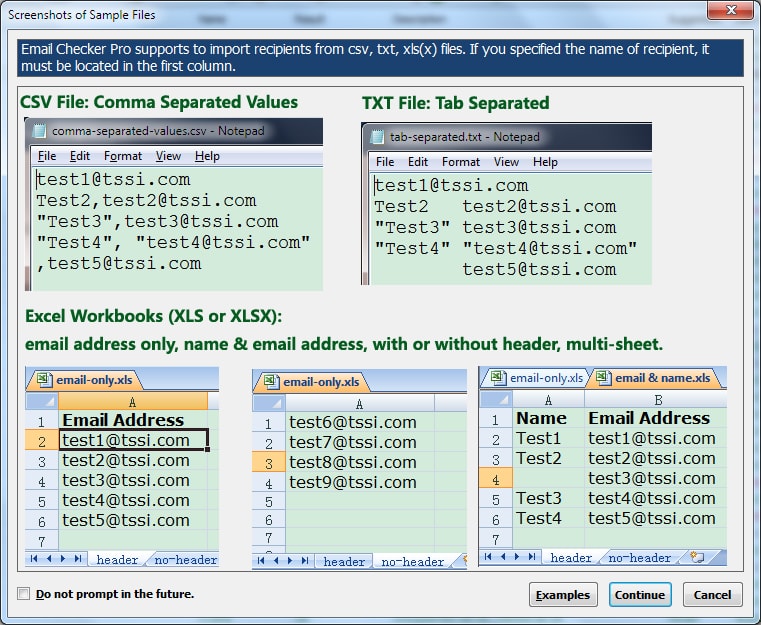
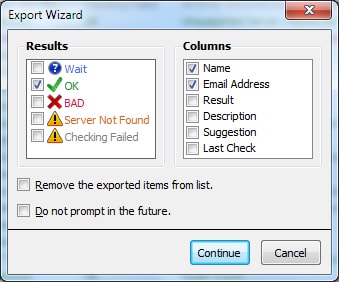
It's very easy to use: just import the email addresses from csv (comma separated values), txt (tab separated) or Excel Workbooks (.xls or xlsx), and then click <Check> button, the results will show soon. And you can also export the results to csv/txt/xls/xlxs files.
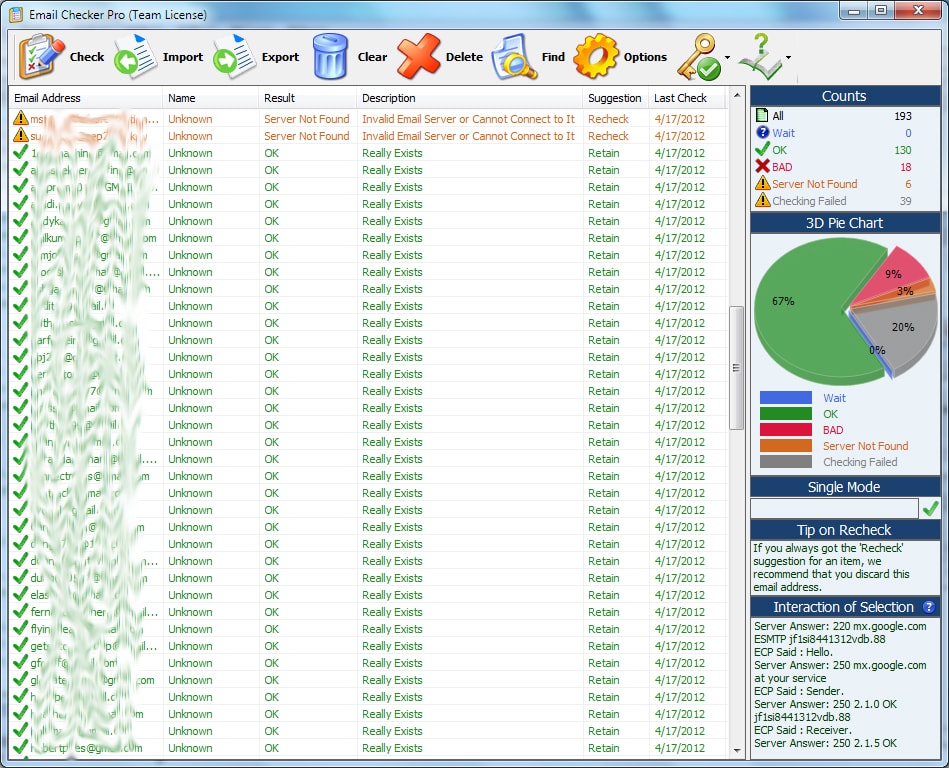
Except displays the results in a list view traditionally, Email Checker Pro also makes the visual statistics by counts and 3D pie chart. The more visual is: the counts and 3D pie chart are updated in real time during checking email addresses.
The result contains the following elements:
[Result]: OK, BAD, Wait, Server Not Found or Checking Failed.
[Description] (reason of result): Really Exists (for OK), Invalid Email Address Format (for BAD), Indeed Nonexistent/Disabled/Unavailable/Discontinued (for BAD), Unsupported Server, Marked as OK (for OK), Invalid Email Server or Cannot Connect to It (for Server Not Found), An Error Occurred During Checking (for Checking Failed).
[Suggestion]: Retain (for OK), Discard (for BAD) or Recheck (for Server Not Found and Checking Failed).
[Last Check]: Email Checker Pro will save the last check date for every email address, and the check rule setting may rely on this date.
[Interaction]: the interaction between Email Checker Pro and destination server during checking.
It works very fast, the more the faster due to use multi-threaded checking, it can check hundreds of email addresses per minute, depends on your computer performance and network speed.
It's very easy to use: just import the email addresses from csv (comma separated values), txt (tab separated) or Excel Workbooks (.xls or xlsx), and then click <Check> button, the results will show soon. And you can also export the results to csv/txt/xls/xlxs files.
Except displays the results in a list view traditionally, Email Checker Pro also makes the visual statistics by counts and 3D pie chart. The more visual is: the counts and 3D pie chart are updated in real time during checking email addresses.
The result contains the following elements:
[Result]: OK, BAD, Wait, Server Not Found or Checking Failed.
[Description] (reason of result): Really Exists (for OK), Invalid Email Address Format (for BAD), Indeed Nonexistent/Disabled/Unavailable/Discontinued (for BAD), Unsupported Server, Marked as OK (for OK), Invalid Email Server or Cannot Connect to It (for Server Not Found), An Error Occurred During Checking (for Checking Failed).
[Suggestion]: Retain (for OK), Discard (for BAD) or Recheck (for Server Not Found and Checking Failed).
[Last Check]: Email Checker Pro will save the last check date for every email address, and the check rule setting may rely on this date.
[Interaction]: the interaction between Email Checker Pro and destination server during checking.



|
| Version Release/Update Date |
Features / Improvements | Bug Fixes |
| 4.1 Aug 25, 2013 |
|
|
| 4.0 Aug 21, 2012 |
|
|
| 3.2 Apr 18, 2012 |
|
|
| 3.1 Feb 07, 2012 |
|
|
| 3.0 Dec 01, 2011 |
|
|
| 2.2 Oct 08, 2011 |
|
|
| 2.1 Jun 26, 2011 |
|
|
| 2.0 Feb 01, 2011 |
|
|
| 1.2 Dec 22, 2010 |
|
|
| 1.1 Jul 11, 2010 |
|
|
| 1.0 Mar 20, 2010 |
|
1. Easy Way
Just click the related buttons on the right to share it to Facebook, Twitter, Google+, etc.2. Manual Sharing
You can also manually share it by using the following text in your email or other places.Subject: Recommend software - Email Checker Pro: quickly check if email addresses are really existing in batch mode (from 'your name here')
Content:
Hi,
I'm using Email Checker Pro, it can quickly check and verify whether the email addresses are valid (format or syntax) and really existing on the corresponding email servers without sending in batch mode. Usually, I use it to maintain a clean emailing list.
You should have a test!
Official page: https://www.automailsender.com/email-checker/p.htm
Direct download: https://www.automailsender.com/email-checker/email-checker-pro.zip
R
By Rich Kern @ Dec 25, 2021
I am very pleased with its results and performance
I just purchased Email Checker Pro, I am very pleased with its results and performance. I have a group of about 2000 emails that are updated yearly. I just ran a test on 500 from last year and compared that to the failed ones from then that I had to handle manually (what a pain in the a** that is every year). It took about 60 seconds and the results compared very favorably with my manual removal process). Glad I purchased this program. It is going to save me tons of time each year.
3
By 3d2f.com @ Aug 31, 2019
Email Checker Pro - a powerful email address verification tool offering outstanding flexibility and speed
Email campaigns still remain one of the most efficient methods of marketing products and services, as well as staying in touch with existing customers. However, email lists are not constant - recipients come and go, change addresses and close their accounts all the time. This means that if you use newsletters as one of your marketing and sales channels and want to make sure that your messages go to valid and regularly used email addresses, you need a tool like Email Checker Pro!
Email Checker Pro is an extremely fast and accurate tool capable of validating thousands of email addresses in the batch mode. The program makes sure that each address has a valid format and actually exists on the corresponding server. Thanks to the support of multi-threaded processing, the software can validate hundreds (up to 1000!) of addresses per minute, depending on the speed of the system and network bandwidth. Using the program is also a snap: all you need to start is to import addresses from a CSV file, a plain text file or an Excel workbook, and hit the Start button. The results will be shown in a table and a 3D pie chart for a more visual approach. Once the validation process is completed, you can export the results to a new file, skipping bad or suspicious addresses.
Email Checker Pro is an invaluable tool for any online marketer or a company that uses email blasts to reach its current or prospective customers. Fast, easy-to-use and ultimately reliable, it will make sure that valuable information is sent only to active and valid email addresses and that the corporate mailing list remains clean at all times!
S
By Softpedia.com @ Sep 23, 2017
Checks validity for email addresses
Email Checker Pro is a handy and reliable application designed to verify whether the specified email addresses exist.
Email Checker Pro is able to process a list of email addresses in batch mode. All you need to do is import the list and press the 'Check' button.
The 3D pie chart allows you to view the percentage of correct email addresses from the imported list.
B
By BitsDuJour.com @ May 06, 2015
Automatically Validate Hundreds of Emails in Batch
If you do a lot of work that involves email addresses, you know how frustrating it is to send out an email blast, only to be met with multiple bounced messages! Each invalid email address represents lost time and effort on your part, but is there a quick way to find out if an address is valid, before you send anything out? Indeed there is, and it's today's discount software promotion, and it's called Email Checker Pro!
Email Checker Pro lets you verify the validity of multiple email addresses in batch mode, without the need to send a single thing. With Email Checker Pro, you can import and export huge lists of email addresses in CSV, TXT, and XLS format, then sit back as Email Checker Pro leverages the power of multithreading to validate anywhere from 500 to a whopping 1,000 addresses per minute! As the validation process proceeds, Email Checker Pro gives your eyes a visual treat by building, in real time, 3D pie charts and counts showing how many addresses are the real deal.
Once the validation process is complete, Email Checker Pro gives you a rundown of how each email address checks out, including reasons why any particular email address comes back as invalid. The result? The cleanest email distribution list you've ever worked with, and a lot of saved time and effort! All this and more with a copy of Email Checker Pro!