AMSBE Documentation - Contacts manager interface manual
 Download Auto Mail Sender™ Birthday Edition
Help Home
AMS Birthday Edition Home
eMail & eMailing Software Home
Produced by TriSun Software
Download Auto Mail Sender™ Birthday Edition
Help Home
AMS Birthday Edition Home
eMail & eMailing Software Home
Produced by TriSun Software
Purpose
Manages all your contacts.
Open Method
Click 'Persons -> Contacts manager' module link on the main interface.
Interface and Illustration
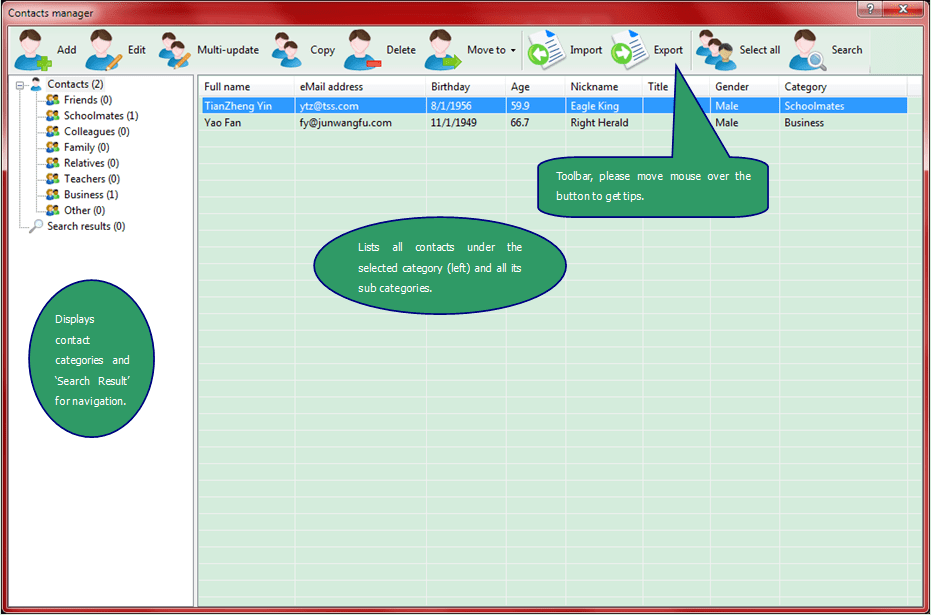
Commands Reference
- <Add> - adds a new contact on Contact editor interface <Ctrl+N>.
- <Edit> - edits the selected contact on Contact editor interface <Ctrl+E or double-click>.
- <Multi-update> - updates the sending settings for the selected people on the Multi-update the selected people interface <Ctrl+U>.
- <Copy> - duplicates the selected contact <Ctrl+C>.
- <Delete> - deletes the selected contact(s) <Del>.
- <Move to> - moves the selected contact(s) to specified category.
- <Import> - imports contacts from the specified file <Ctrl+I>.
- <Export> - exports all contacts to a file for backing up <Ctrl+O>.
- <Select all> - selects all contacts in current list <Ctrl+A>.
- <Search> - finds contacts according to the specified conditions on the Search contacts interface <F3>.
Download Auto Mail Sender™ Birthday Edition for Microsoft® Windows®.