AMSBE Documentation - Festivals manager interface manual
 Download Auto Mail Sender™ Birthday Edition
Help Home
AMS Birthday Edition Home
eMail & eMailing Software Home
Produced by TriSun Software
Download Auto Mail Sender™ Birthday Edition
Help Home
AMS Birthday Edition Home
eMail & eMailing Software Home
Produced by TriSun Software
Purpose
Manages all your festivals.
Open Method
Click 'Festivals -> Festivals manager' module link on the main interface.
Interface and Illustration
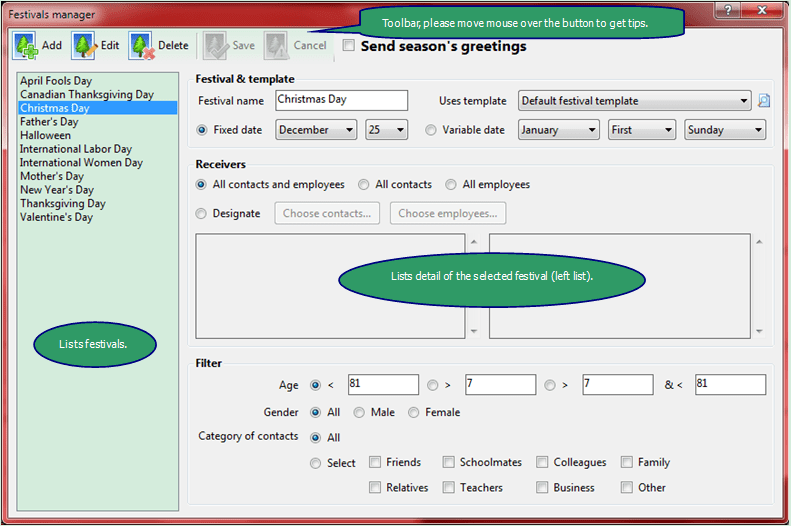
Fields Explanation
- [Filter] - only available where 'All contacts and employees', 'All contacts' or 'All employees' is checked. 'Category of contacts' is only available where 'All contacts and employees' or 'All contacts' is checked.
Commands Reference
- <Add> - adds a new festival <Ctrl+N>.
- <Edit> - edits the selected festival <Ctrl+E>.
- <Delete> - deletes the selected festival <Del>.
- <Save> - saves current festival <Ctrl+S>.
- <Cancel> - cancels your changes in current festival <Ctrl+D>.
 - views the selected email template.
- <Choose contacts...> - chooses contacts to receive the greeting of current festival, only available where 'Designate' is checked.
- <Choose employees...> - chooses employees to receive the greeting of current festival, only available where 'Designate' is checked.
Download Auto Mail Sender™ Birthday Edition for Microsoft® Windows®.