 Auto Mail Sender™ Standard Edition
 Auto Mail Sender™ Birthday Edition
 Auto Mail Sender™ File Edition
 TSSI .NET SMTP Component
 Email Checker Pro
 Download


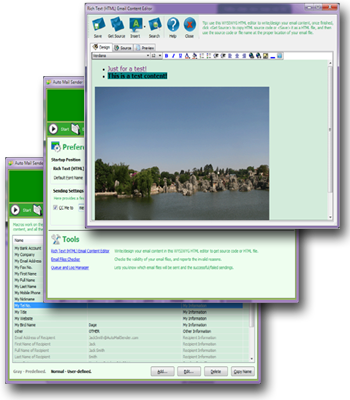
Auto Mail Sender™ File Edition (AMSFE) is a powerful and flexible automatic emailer, it can use your files to send emails automatically at anytime and any frequency as you expect.
You can use your favorite text editor to write all the email elements and various sending schedules (such as yearly, monthly (day, day-of-week, last day), weekly, daily and any other schedules you can think of) in your files according to the email interface definitions and sample files, currently supports Text/Initialization/Configuration Files (*.txt;*.ini;*.cfg) and XML Files (*.xml).
AMSFE provides you with the email interface definitions, sample files and some basic settings, it supports almost all the traditional email elements/functions and some distinctive elements/functions such as sending schedule, sending one by one with interval (seconds) setting, repeated sending, automatic resending if failed with maximal times and interval (minutes) settings, macros manager & built-in macros (recipients, sending date time and your information), folder attachment supportable, emptying folder after sent it successfully, set more than one sendings at the same time, SMTP accounts list and automatic selecting the available one if the default is not available, deleting email file after sent it successfully (commonly used for the one-off file that produced by other programs/devices), proxy servers list and automatic selecting the available one if the default is not available, queue and log manager, email files checker, email folder manager, sending a copy to you for each outgoing message, WYSIWYG rich text (HTML) email content editor, custom sender/reply receiver/read receipt receiver, reading recipients/content from external files, SSL/TLS security SMTP connection, creating the popular SMTP accounts directly, Unicode supportable, auto-complete SMTP account settings, and so on.
You can inform yourself or others, submit work logs or documents, and send the routine business emails, surely, make ads and greet your family members or friends at their important day (for instance: birthday) through use of AMSFE.
Besides, you can also use AMSFE as a plug-in module/programming interface to get automatic emailing for your other programs/devices due to it provides you with the email files interface.
You can use your favorite text editor to write all the email elements and various sending schedules (such as yearly, monthly (day, day-of-week, last day), weekly, daily and any other schedules you can think of) in your files according to the email interface definitions and sample files, currently supports Text/Initialization/Configuration Files (*.txt;*.ini;*.cfg) and XML Files (*.xml).
AMSFE provides you with the email interface definitions, sample files and some basic settings, it supports almost all the traditional email elements/functions and some distinctive elements/functions such as sending schedule, sending one by one with interval (seconds) setting, repeated sending, automatic resending if failed with maximal times and interval (minutes) settings, macros manager & built-in macros (recipients, sending date time and your information), folder attachment supportable, emptying folder after sent it successfully, set more than one sendings at the same time, SMTP accounts list and automatic selecting the available one if the default is not available, deleting email file after sent it successfully (commonly used for the one-off file that produced by other programs/devices), proxy servers list and automatic selecting the available one if the default is not available, queue and log manager, email files checker, email folder manager, sending a copy to you for each outgoing message, WYSIWYG rich text (HTML) email content editor, custom sender/reply receiver/read receipt receiver, reading recipients/content from external files, SSL/TLS security SMTP connection, creating the popular SMTP accounts directly, Unicode supportable, auto-complete SMTP account settings, and so on.
You can inform yourself or others, submit work logs or documents, and send the routine business emails, surely, make ads and greet your family members or friends at their important day (for instance: birthday) through use of AMSFE.
Besides, you can also use AMSFE as a plug-in module/programming interface to get automatic emailing for your other programs/devices due to it provides you with the email files interface.
Read Full Description in Auto Mail Sender™ File Edition's Online Documentation

1. Easy Way
Just click the related buttons on the right to share it to Facebook, Twitter, Google+, etc.2. Manual Sharing
You can also manually share it by using the following text in your email or other places.Subject: Recommend software - Auto Mail Sender File Edition: use files to send emails automatically (from 'your name here')
Content:
Hi,
I'm using Auto Mail Sender File Edition, it's a powerful and flexible automatic emailer and provides the Free license for you, it can use your files to send emails automatically at anytime and any frequency as you expect.
You should have a test!
Official page: https://www.automailsender.com/file-edition/
Direct download: https://www.automailsender.com/file-edition/auto-mail-sender-file-edition.zip
B
By BitsDuJour.com @ Mar 12, 2013
Automatically Send Emails on Your Own Schedule
Email messaging is a wonderful invention, but it lacks the flexibility to send emails on your own schedule. Even so-called email "schedulers" only let you specify a certain date and time to send an email -- any attempt to secure a more detailed or advanced emailing schedule is met with disappointment and failure! That's why today's promotion features Auto Mail Sender™ File Edition, a highly configurable automated email software solution for Windows users, available at an amazing discount!
Auto Mail Sender™ File Edition lets you use simple text files to transmit emails at any time, and with any frequency! With Auto Mail Sender™ File Edition, you'll be able to customize the software to send messages on a routine basis, such as by date, day of the week, weekly, daily, almost any period that you can imagine. Plus, interval settings let you send emails with any frequency that you choose, even down to seconds. Of course, Auto Mail Sender™ File Edition supports resending failed deliveries, built-in macros, multiple emails, and folder attachments.
Just think of all of the uses for a software program like Auto Mail Sender™ File Edition! Those work logs or status documents that you send every week? Done. Routine business emails? Done. Even birthday and anniversary greetings can be set up in advance and set to repeat, ensuring that you'll never be chided for forgetting an important date ever again! It's all yours with today's promotion, available at a great discount.